Thursday, May 14, 2015

12 Days of Photoshop - Day 3

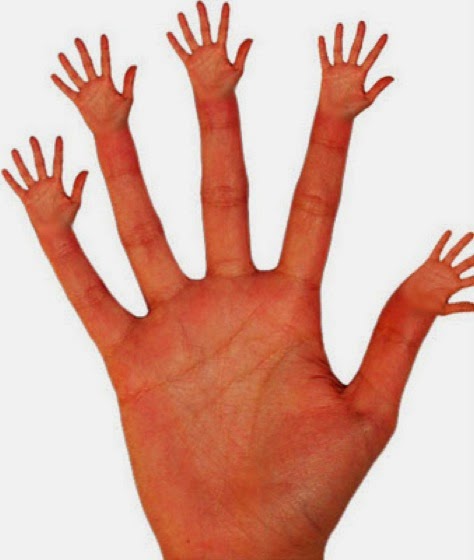
On the third day of photoshop, our project was "Some Scrambled Bodies Looking All Crazy!" The main idea of this project is to put body parts where they might not usually be. An example Mr. Sands showed us was the generic hands on fingers.

I got my idea from spy kids, those ninja thumb guys whose whole bodies were thumbs:

For my scrambled body parts, I chose a regular business guy

and a picture of a hand

I cropped out two of the fingers and transformed it until it seemed to fit his pants and body measurements. Afterwards, I cropped out his legs and placed the fingers underneath him and used blur and smudge effects to make it look as if his belt turned into fingers. This is the final product


Wednesday, May 13, 2015

12 Days of Photoshop - Day 2

On the second day, we did the project "True Identity" which is basically a reflection or shadow that shows an object/animals true self. For this project we used photoshop to make a shadow effect and I chose Kermit and Jim Henson, creator of The Muppets.


First I cropped Henson out of his photo and decided on a stage background. Then I cropped the white background from Kermits picture. I painted Kermit black and used blur and a lighter opacity to make it seem like a shadow, faded. After that, I pasted Kermit onto the stage and added Henson as well. After some editing and transforming, this is the final product, Jim Hensons true identity is Kermit or vice versa.

Tuesday, May 12, 2015

12 Days of Photoshop - Day 1

For the first day of 12 Days of Photoshop, we did "Something Sliced" which is the technique in which you slice an animal or object or food open and there is something unexpected inside. An example Mr. Sands showed us was a frog sliced open and a watermelon inside.

For my sliced project, I decided to do a lime inside a kiwi because both fruits are green and look cool.


The final project ended up pretty well considering I added a drop shadow both inside the lime and outside the kiwi.

Monster Final Project

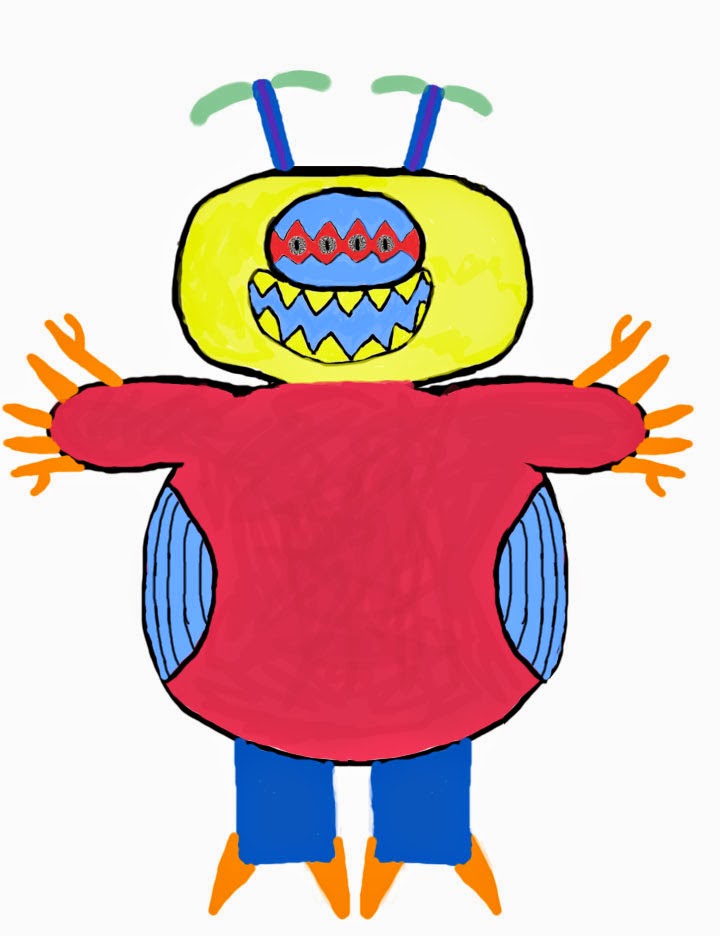
For this monster project, first graders from Apex Elementary School drew monsters and our job was to sculpt them out of clay and design a package idea as well as packaging them. The monster I got was drawn by a kid name Micah and it was relatively rounded and had a circular image to it.


I had to adjust the leg size because the heavy weight of the clay could not stand on two blue sticks. After painting the Micahsaur, I added blue wires to the top of his head rather than more clay and I actually forgot to add orange sticks for his fingers and toes. But the clay model resembles Micahsaur so it is okay. I didnt have googly eyes to add so I just drew in the eyes with black pen.

For packaging, I used photoshop and the circles pattern. I forgot to put tissues in the package. Sorry kid. But it looks pretty great so they should be greatful


This is the Micahsaur I drew on photoshop to use on the box that we had spray painted the day before. We used the bamboo tablet things to draw on and it was hard at first but we got the hang of it after a while.


Monday, May 11, 2015

Anamorphosis Final Project

Anamorphosis is a distorted projection or perspective that requires the viewer to use special devices or a specific vantage point to view the image the correct way. The anamorphosis we incorporated into our drawings was the technique the angle was distorted. An example Mr. Sands showed us was the rubix cube as shown below:

When viewed at a certain angle, the rubix cube looks normal and 3D.


However, this is the actual image printed out when viewed straight on


After finding an image to use online, we used photoshop to transform the object (lengthen and skew) and then printed it out after checking to be sure it would look normal. Once the image was printed, to make the object look more authentic, we cut the white space around the top of the object to make it look as if it popped off the page. I tried my hand at this project and I chose a chair.

This is the original chair image

This is the chair image after i lengthened and skewed it in photoshop and printed it out.
Viewed at an angle:


The chair viewed straight on:

I am currently copying the image over onto a blank sheet that I drew a grid on as well.
Wednesday, April 22, 2015

Post-It Note Project

For the post-it note final project, first I made my own pixel-ized image to submit. I chose the image of our current principal, Dr. Kearney.


However, the images of Morgan Freeman and Paul Walker were chosen to make over mine. My table made the left half of Walker's face and the table beside us made the right half.  This is the image we had to use -


This is me working on the sticky note project - 


This is my group working together kind of -


This is me working because I am cool - 


This is me chipmunking - 


This is Morgan's head -


This is a zonkey Mr. Sands drew -


The finished Morgan Freeman at AHS - 


The finished Paul Walker at Cary Towne Center - 

Friday, March 20, 2015

Photography/Photoshop Final Project

For my photography final project I took a picture frame and stood around outside trying to find the perfect pose.

After taking the picture we went back inside and I photoshopped a picture of a Spongebob wallpaper into the frame because I am Asian and Asians are yellow. Also I like Spongebob. It was hard making the Spongebob image the same size as the frame and I also had to skew the yellow thing because when I held the frame outside it was at an angle.

~~~~~~~~~~~~~~~~~~~~~~~~~~~~~

For my Newimal I combined a Sea Lion and a Grizzly Bear. They are very cute and can kill I think.

~~~~~~~~~~~~~~~~~~~~~~~~~~~~~

Also for one last one, I did the light drawing rave party.
That is me eating a bowl of rice with chopsticks because I am Asian. Morgan drew the very nice bowl of rice and I think Caitlin is in the back highlighting me because she wanted to.

~~~~~~~~~~~~~~~~~~~~~~~~~~~~~

Also since today is March 20, International Day of Happiness, here is a funny picture with my face